Exploring the DeepSeek (Everything is a Plugin) Harness
What an agent harness is, and how the DeepSeek “Everything is a Plugin” harness wraps a model with a loop, memory, tools and a sandbox, in diagrams.
Overview
SOTA model providers have focused on pushing out new, more sophisticated models, like GPT 6-Astra. That specific model hit an almost perfect score on the ARC-AGI-3 benchmark because of its proprietary harness, NOT the model itself. OpenAI’s AGI number came from a harness, not the model.
To any power user or solution architect, that's nothing new, yet the average Joe can easily ignore it. To make this point, we'll look at the “DeepSeek Everything Is A Plugin” harness to show how a model’s capabilities can evolve to the next level, largely because of the environment it operates in.
Key takeaways
- An agent harness is the runtime wrapped around a language model: the loop that calls it, the code that runs its tools, the memory that keeps context usable, and the sandbox that limits what tools can touch.
- Every harness implements five parts around the model: an agent loop, a tool router, memory, planning, and a boundary (sandboxing and permissions).
- Whether an agent recovers from a failed tool call or stalls depends on the harness, not the model.
- The DeepSeek harness runs as one host process on your machine, and every part of it, including the agent loop, is a plugin.
What is an Agent Harness Anyway?
You'll find tons of definitions of an agent harness online. Still, the simplest way to put it is this: the environment an LLM operates in, which unlocks the capabilities for a Large Language Model to perform actions far beyond gushing out next-token predictions.
In that sense, a harness is the runtime operations wrapped around the language model. While the model takes in the context you provide it, alongside a list of tool schemas, and predicts the next output, be it a message or a tool call, the harness performs all the rest of the work.
The harness includes the loop that calls the model(s), the code that runs the tools, the memory that keeps context usable across dozens of tools, and the sandbox that limits what tools can touch. Whether an agent can recover from a failed tool call or stalls and loses track depends on the harness, not the model.
Every harness has to implement five parts around the model:
- Agent loop: feeds each model output back in as the next turn's input until the task ends (
dsh-agent-loop). - Tool router: sends tool calls to the filesystem, shell, LSP, or outside services (
ctx.subprocess, thelsptool, the GitHub webhook adapter). - Memory: decides what context carries into the next turn.
dsh-compaction, with its tool-result pruner and image offload, does this on top of an event-sourced session store. - Planning: breaks a large task into steps before anything runs (
dsh-plan-mode). - Boundary: sandboxing and permission rules that limit what tools can reach (the sandbox backends, the sandboxed filesystem,
ctx.approval).
On top of these, the harness coordinates subagents (e.g., ctx.subagents), forks conversations, or spawns in-process or external agents over the Agent Communication Protocol (ACP). It executes background jobs (ctx.jobs).
A simple way to illustrate this is:
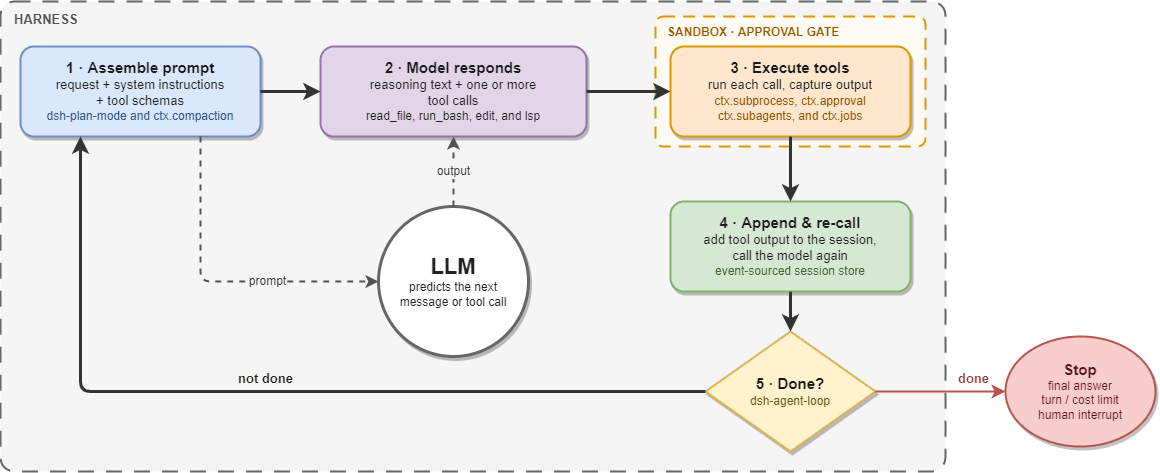
- The harness builds the prompt: the user's request, the system instructions, and the schemas of the tools it exposes.
- The model responds with reasoning text and one or more tool calls.
- The harness runs each tool call, inside the sandbox and approval gates, and captures the output.
- The harness adds the output to the session and calls the model again.
- This repeats until the model gives a final answer, or until a turn or cost limit, or a person, stops it.
This loop (like the ReAct pattern, Yao et al., 2022) is the same in every harness. Different harness providers usually use different mechanisms for steps 3 and 4. Meaning how they plan, what compact mechanism they use, how isolated their sandbox is, and whether they can hand a sub-task to a subagent without cluttering the main session. When any of these fails, the result looks the same from outside: the agent stalls, forgets its goal, or uses up the context window on a task that should take five turns.
DeepSeek Harness Part 1: The High-Level Representation
While you might imagine that the harness itself is rather simple considering what we discussed, this couldn’t be further from the truth. The harness from an eagle's-eye point of view looks like this:
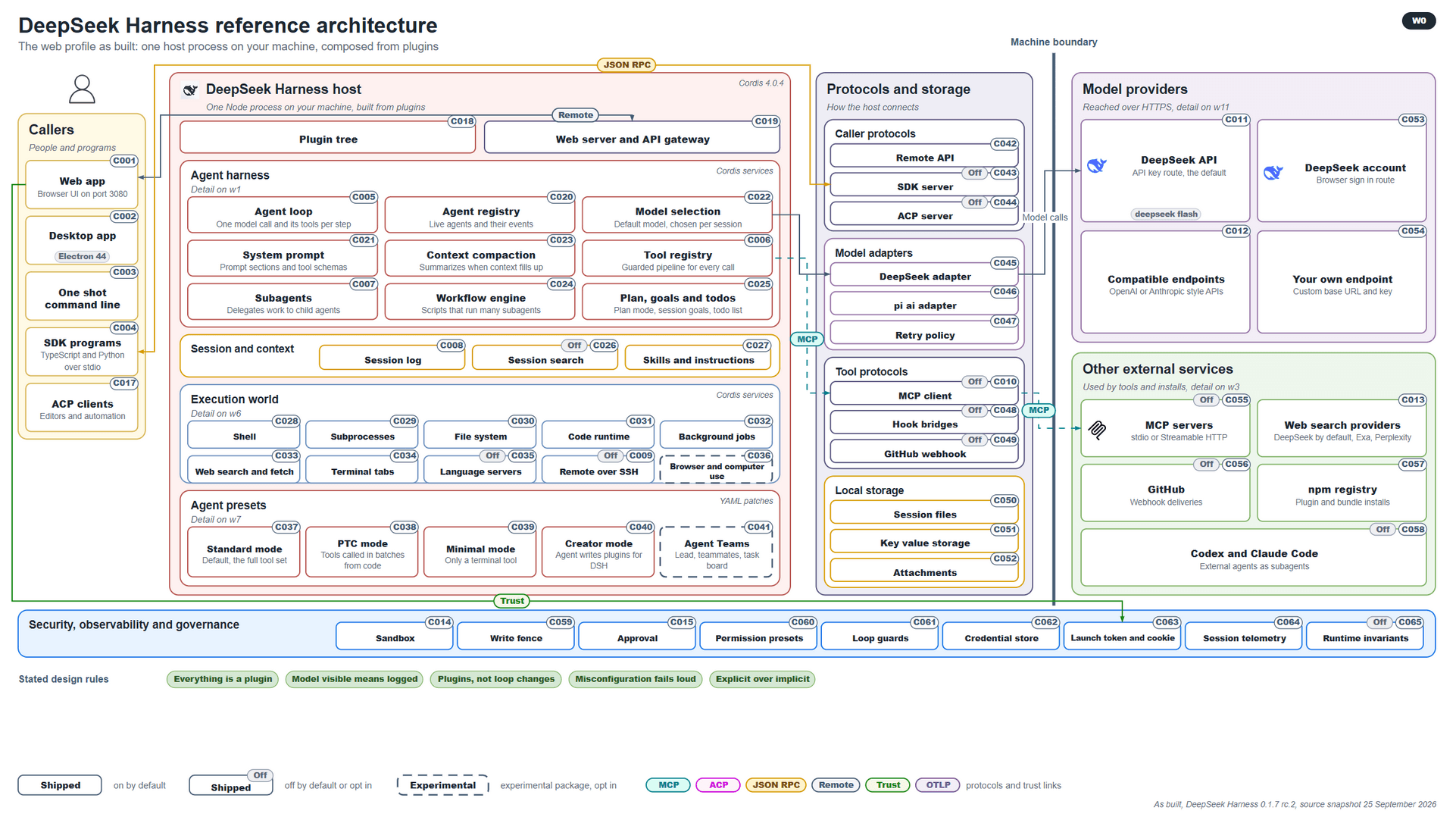
A lot of people forget that a harness, by nature, must be able to operate from any place, be it the provider’s web application (AI Interface) like ChatGPT or Claude.ai, a Desktop application, a CLI-based application, the SDK, or through ACP callouts (at times A2A). And all of that is just the forefront of it.
Beyond that, you also have the overall harness structure, which is separated into five distinct layers.
- The ability to call different plugins and skills, as well as to operate remotely via a Web Server and API gateway.
- The agent harness, which will illustrate the agent loop, agent registry, model selection capabilities, and so on.
- The session and context handling for the log to be easily exportable, traceable, and observable by both the agents and third-party systems (e.g., Loki, LangGraph, LocalTokenomics, Prometheus, Splunk, and others).
- The execution layer, which may be the execution of shell commands, subprocesses, accessing file systems, code runtime capabilities, background jobs, web searching, and many others.
- As well as the agent presets, which have different mods based on the agent granularity you are willing to go for.
Beyond those five, you also have the protocols and storage layer, where the host model needs to connect to different callers, model adapters, tool protocols, local storage to write deliverables to, model providers reached over HTTPS, and other external services.
A security, observability, and governance layer must wrap all of this to ensure agents operate only in a sandbox environment with proper approval, permissions, loop guards, and similar controls to avoid system outages or deleting a production database.
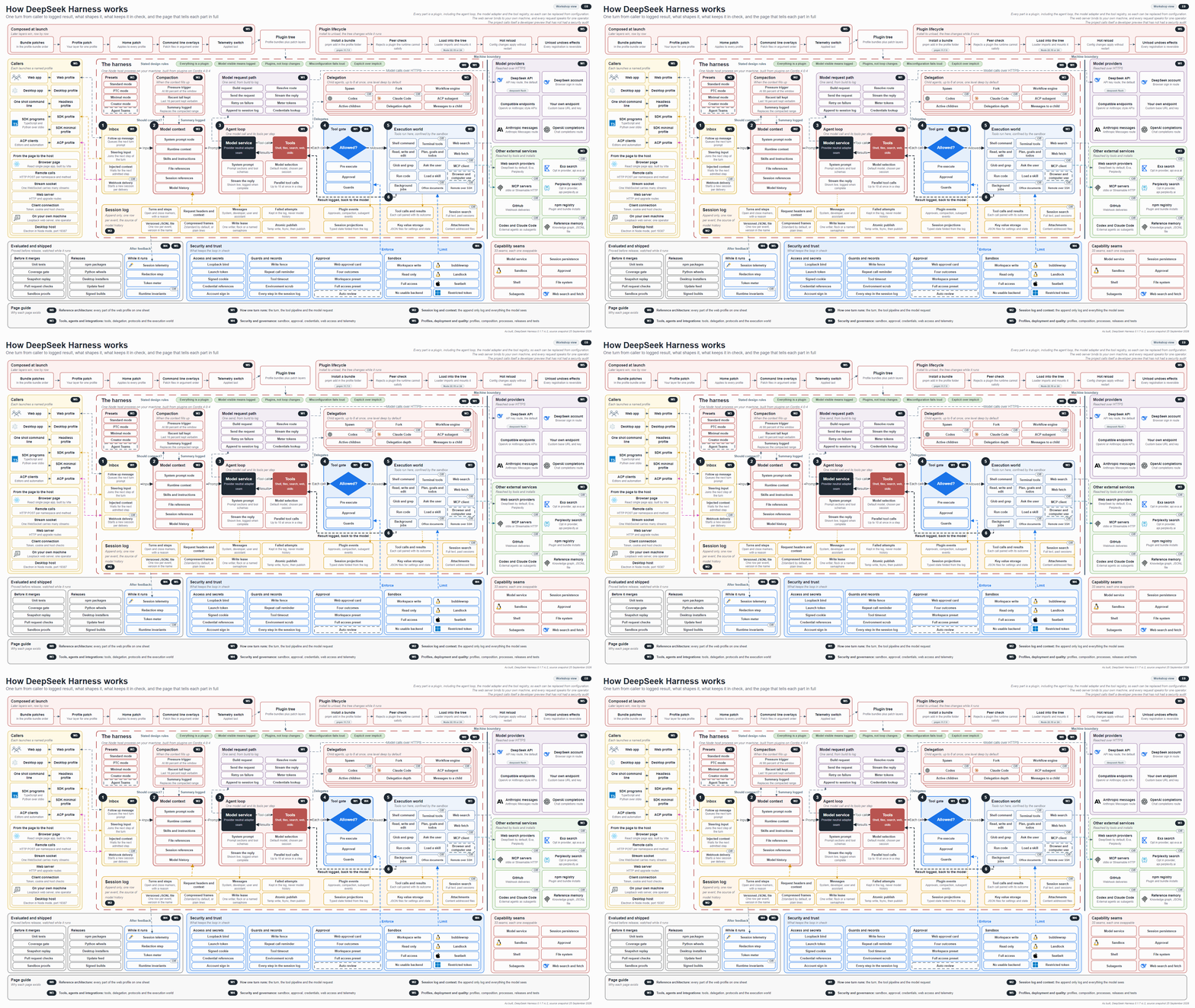
For the rest of the article, we will explore the full end-to-end implementation of the DeepSeek Harness: Everything is a Plugin, and why the above image is a simplification of the monstrous harness that is this thing here:
Part 2: The Agent Harness Internals
For a harness to operate, we need to understand the philosophy behind the loop.
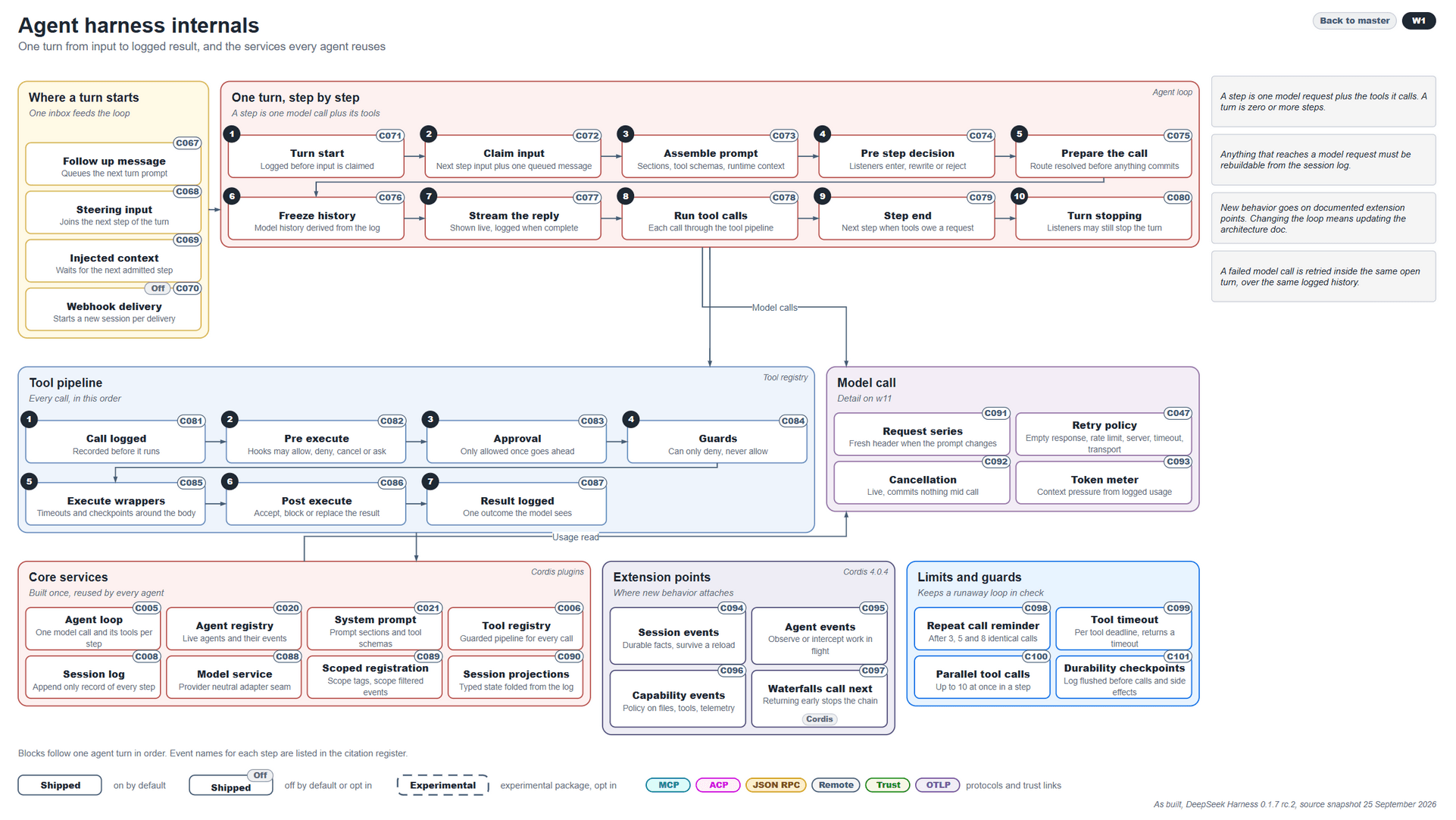
When you send a message to an AI coding agent, it has four questions it needs to answer before it takes a turn.
- Is this a follow-up message that needs to consider prior context?
- Is the new user-provided input a steering direction before the next turn takes place?
- Is new context being injected that will directly impact the current step, the ones before it, or any future ones?
- Or is there a webhook callout that will require a new session to be started upon delivery?
Once the model answers that, it enters a turn loop from the “Turn Start” step to the “Turn Stopping” step. Between the start and finish, it needs to ensure all input context is loaded, the prompts are properly assembled to consume set content, and to break down its work into steps, each of which might require a call to be sent out, a reply to be streamed, tools to be called, and the like.
What’s more, a simple tool call can require a separate 7-step process, starting with logging the call so the system knows it exists. Another pre-execution step is to determine whether a hook in the harness allows, denies, cancels, or requests permission for a tool to be used in this specific situation. Once approval is granted, we put guardrails in place to ensure a call can be denied or allowed. Only then does any execution happen.
At the same time, for model calling, we send a request through the API to the selected model to check availability and retry the call if the response is empty, rate-limited, or delayed by server timeouts or transport failures. Two other possible options are a cancellation or token meters exceeding the limit.
When those actions have taken place, the model will consider all possible core services it has access to:
- Structured agent loops
- Agent registries to understand all possible agents
- The system prompt it must abide by
- The tool registry to understand its capabilities
- Session logs to ensure both this session and other external ones are accessible
- Model service capabilities to allow model switching
- Scope boundaries for models to operate within
- Session projects to understand the location where to enter a log
Additional elements such as extension points for the models and guardrails are also considered for each separate agent function.
Part 3: Session Logs, Context, and Memory Functions
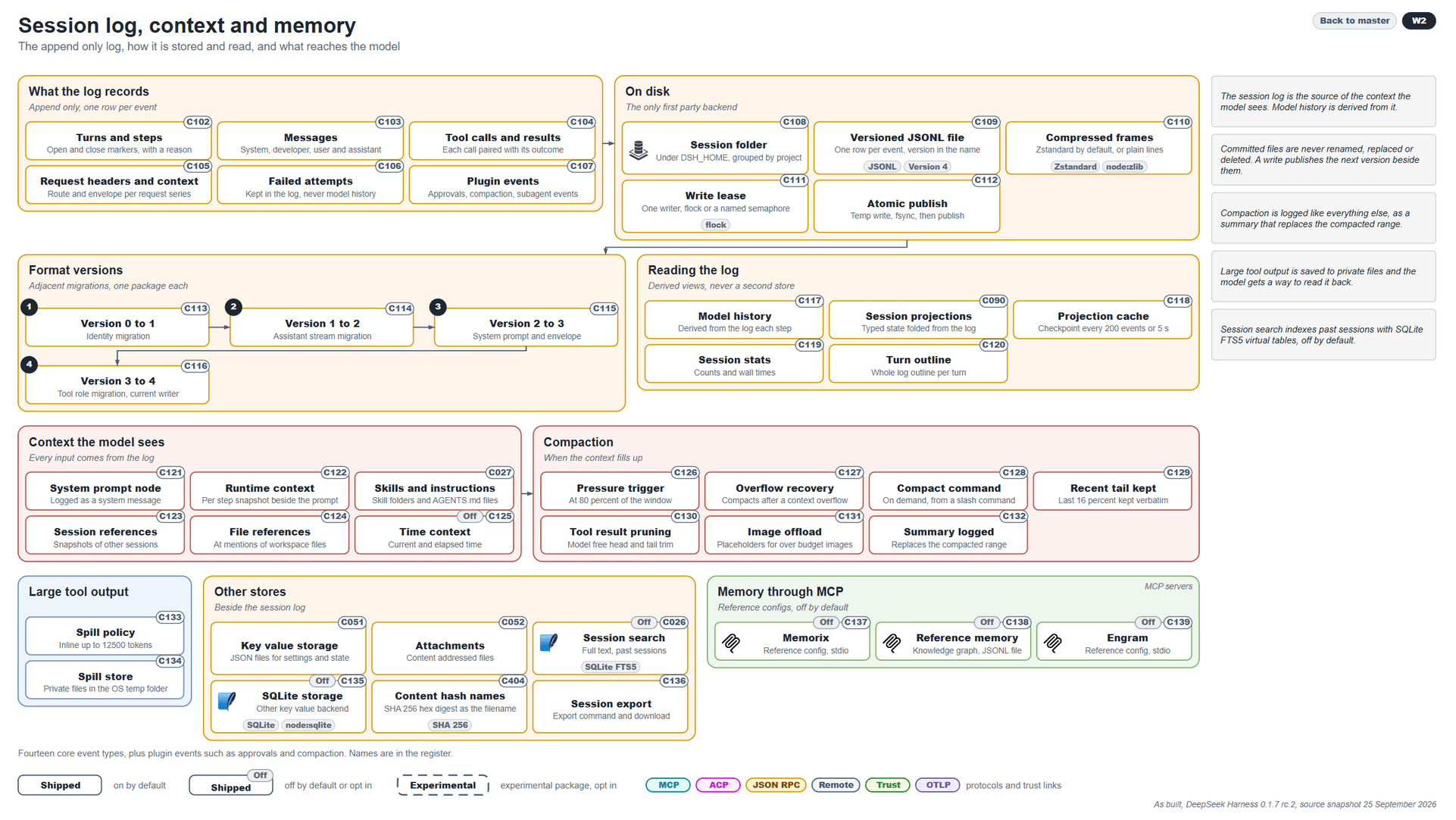
As an agent goes through its actions, a session is created; the session is split into the following set of actions:
- Log records: consists of appended logs per event so that any turns and steps, messages, tool calls, request headers and context, failed attempts, and plugin events are registered.
- On-disk writing permissions: specifying the exact session folders to place session records, versioned JSONL files to store the session context, compressed frames managed by Zstandard or otherwise recorded as plain lines, lease writing, and publishing write, fsync, and publish functions, otherwise called “Atomic publishing”.
- Formatting versions: once permissions are granted, we have agent records formatted through 4 distinct versions, ranging from identifying the initial state of migration and stream migrations to encapsulating the system prompt and enveloping it, to finally registering the tool role and current agent writing capabilities.
- Session contents: each session log would contain information on each model’s history, the session’s projections, cached input and output, session starting timestamps, and turn outlines.
- Context management: once the prior four actions are performed, we go on to the input context the model sees, such as:
- System prompt
- Existing runtime context
- Skills and instructions
- Session references
- File references
- Time context
- Compaction: whenever the context limit is close to or hits the context window, compaction is performed as an action that will pressure the model to summarize all of its possible context with several automatic, user-invoked, and system-invoked functions.
In addition, we offer specific large tool-calling outputs and store-write capabilities whenever we want to extend it with a database, SQLite storage, key-value pair storage, and others, alongside memory from connected MCP services.
Part 4: Tools and Integrations
An agent without the proper tooling and integrations is a very smart text editor and nothing more.
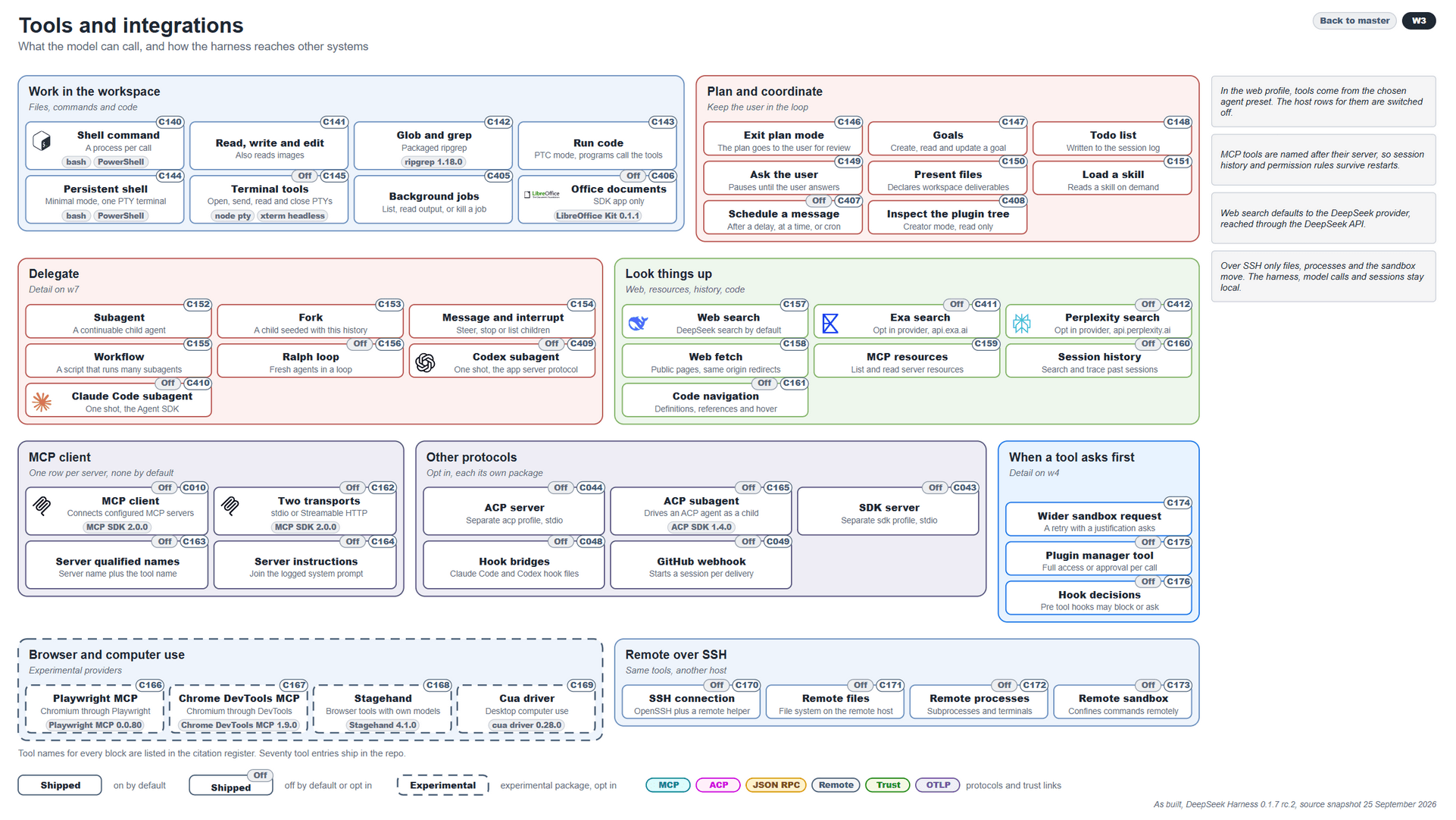
At present, the DeepSeek harness allows any model that operates within its environment:
- Workspace: to use shell commands, CRUD capabilities, glob and grep functions, to execute code, access to persistent shell commands, terminal tooling, background job registration, and offline document contact such as the free LibreOfficeKit.
- Planning and coordination methods: allowing the model to set goals for itself, create to-do lists to follow as a form of chain-of-thought planning, the ability to ask the user questions before taking on an action, presenting users' files within the UI, the ability to load available skills, schedule messages at certain intervals of time, and to inspect and load any available plugins.
What’s more, an agent running within the DeepSeek harness can also:
- Delegate actions to separate subagents, forks, interrupt existing processes, create and execute workflows, perform loops, and run Claude Code and Codex-based agents in parallel.
- Look things up on the internet via an abundance of different tools such as DeepSeek web search, Exa, Perplexity, and many more.
- Connect to any MCP client, execute any sophisticated protocol, request tool permissions, perform browser and computer tasks, and handle remote and SSH calls.
Part 5: Security, Trust Capabilities, and Governance
No harness is ever complete without the proper Security Layer.
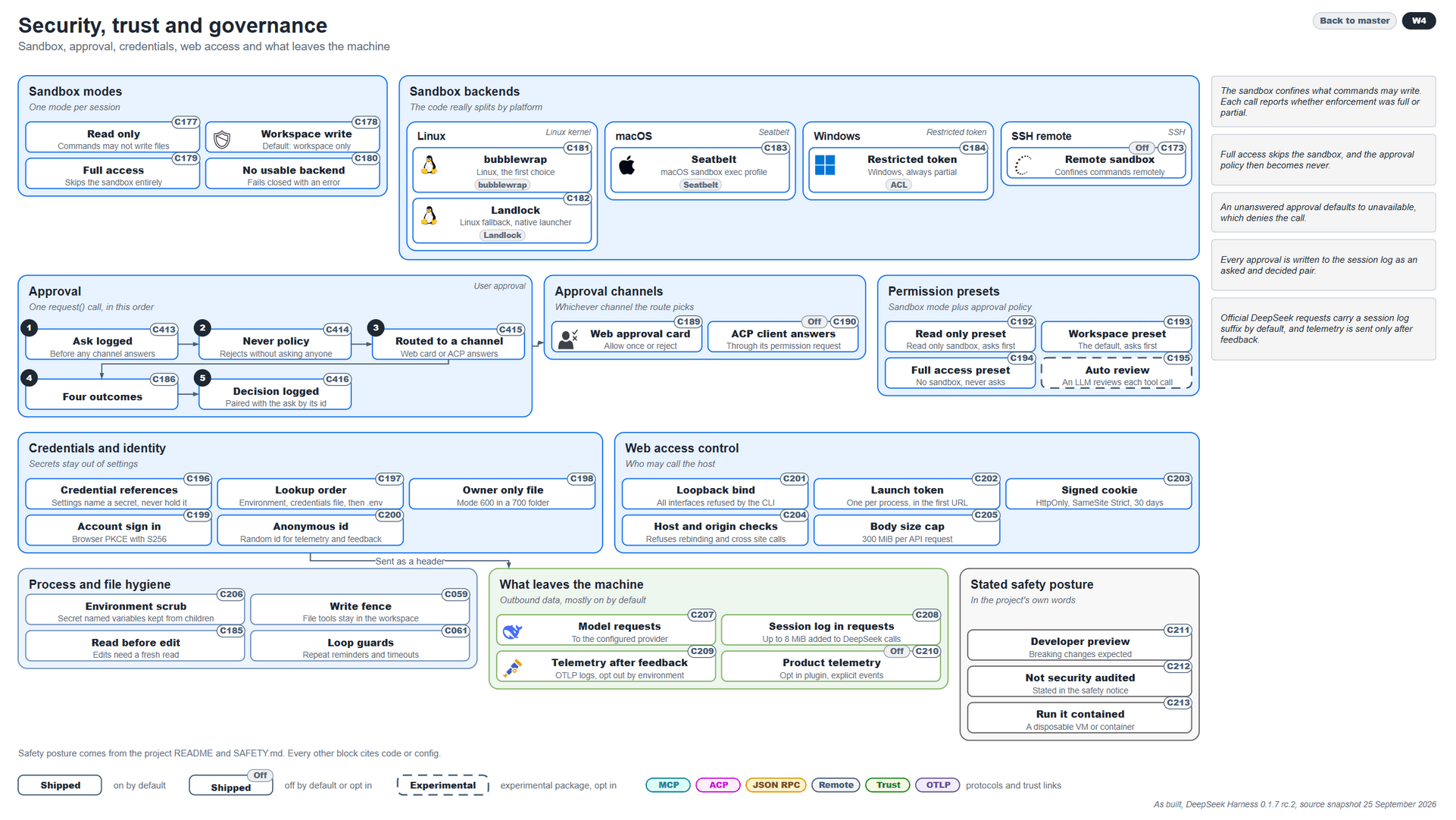
As it stands, the DeepSeek harness isolates sessions within four distinct sandbox modes: Read Only, Workspace Write Capabilities, Full access to the system (skipping the Sandbox altogether), and showing that there is no usable backend.
Once we confirm a sandbox, we know it operates differently based on the OS the user/system is running. For instance, if the system runs on Linux, it uses bubblewrap and Landlock with full capabilities, while on a Windows machine it has a restricted token with ACL capabilities.
Once all are set up, we have a couple more layers:
- Each call must undergo the same 5-step approval loop of asking for a call to be logged, abiding by policies, routing to permissible channels, getting to a specific outcome, and logging the decision.
- Once that is done, we have approval channels: a web client, a desktop application, ACP client answers, or terminal plain text. With that in mind, each distinct agent is assigned specific permission presets; it cannot escape unless provided a different permission set upon restart.
- Each agent and orchestration has a distinct, isolated set of credential access, including specific secrets, lookup capabilities, sign-in, and IDs.
- In addition, agents can get web access, which requires the requester’s token, checks, and a 300 MiB cap per API request.
- After each process concludes, certain deterministic actions, such as environment scrubbing, run under strict rules.
The most important things that leave the designated machine are:
- Model requests, if the models are cloud-based
- Session logs in requests
- Telemetry after feedback, which is collected as OTLP logs
- Product telemetry, which you can opt out of
Cutting this Short
The rest of the harness explanation will be provided with both PNG images and a master drawio diagram you can access at your own pace: DeepSeek Harness In-Depth Analysis on GitHub.
As with anything, exploring a system takes a lot of time, and sadly I have much less time than I’d hoped.
If you’d ever want to discuss how Agentic AI works, to continue this discussion or the like, feel free to reach out to me via the website’s form.
Frequently Asked Questions
What is an agent harness?
An agent harness is the environment a large language model operates in: the runtime wrapped around the model that runs the agent loop, executes tool calls, manages memory and context, plans multi-step work, and sandboxes what tools can reach. The model predicts the next message or tool call; the harness does the rest.
Why does the harness matter more than the model?
Whether an agent recovers from a failed tool call, or stalls, forgets its goal and burns its context window, depends on the harness, not the model. Benchmark results can come from the harness too, as with GPT 6-Astra’s ARC-AGI-3 score.
What does “Everything is a Plugin” mean in the DeepSeek harness?
DeepSeek Harness runs as one host process on your own machine, and every part of it, including the agent loop, the model adapter and the tool registry, is a plugin composed from a named profile.
How does the DeepSeek harness sandbox agents?
It isolates each session in one of four sandbox modes (read only, workspace write, full access, or no usable backend) and enforces them per operating system: bubblewrap and Landlock on Linux, and a restricted token with ACLs on Windows. Every tool call also passes a five-step approval flow that is written to the session log.